Differentiate between basic Python data types and understand when and why they are used
Describe and compare the purposes of Python containers
Use Python methods and operators to manipulate data
📗 Technical Vocabulary
Markdown
Python
Variable
String
Integer
Float
Boolean
List
Dictionary
💡
Why learn Python? Python is an extremely versatile programming language, with many use cases in web development and in machine learning. Its easy-to-read syntax, extensive libraries and frameworks, and robust visualization capabilities make Python the most suitable language for ML developers.
🤔 What is Google Colab?
Colaboratory ("Colab" for short) is a data analysis and machine learning tool that allows you to combine executable Python code and rich text along with charts, images, and more into a single document stored in Google Drive. It is a free Jupyter notebook environment that requires no setup to use.
What's a Jupyter Notebook?
A Jupyter notebook is an interactive digital workspace where you can write and run code, take notes, and show the results all in one place.
In simpler terms, it is a Jupyter notebook with all the collaboration abilities of Google Docs. This means more than one person can work on the same code at the same time.
✨ Before We Start
Head to drive.google.com and create a folder to save your notebooks as we go. This will help you stay organized!
🌱 Let’s Start!
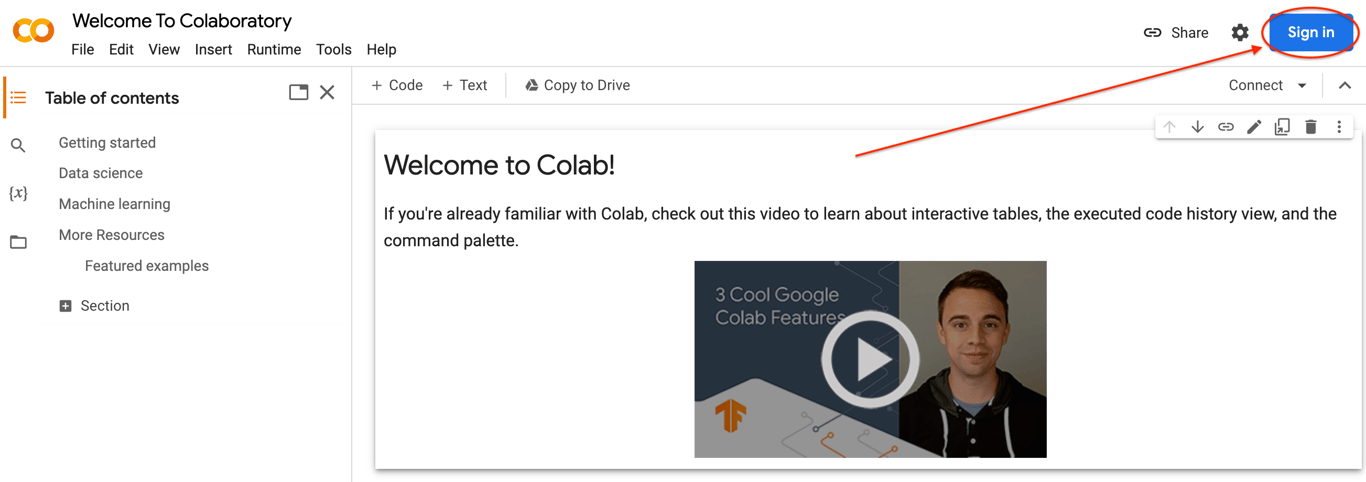
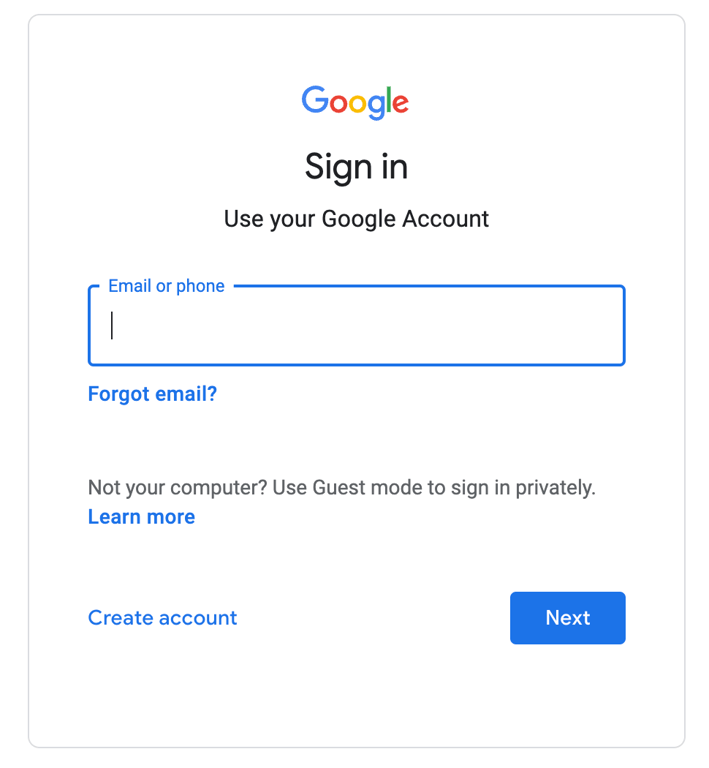
Navigate to Google Colab. Click “Sign In,” and log in with your Google account.
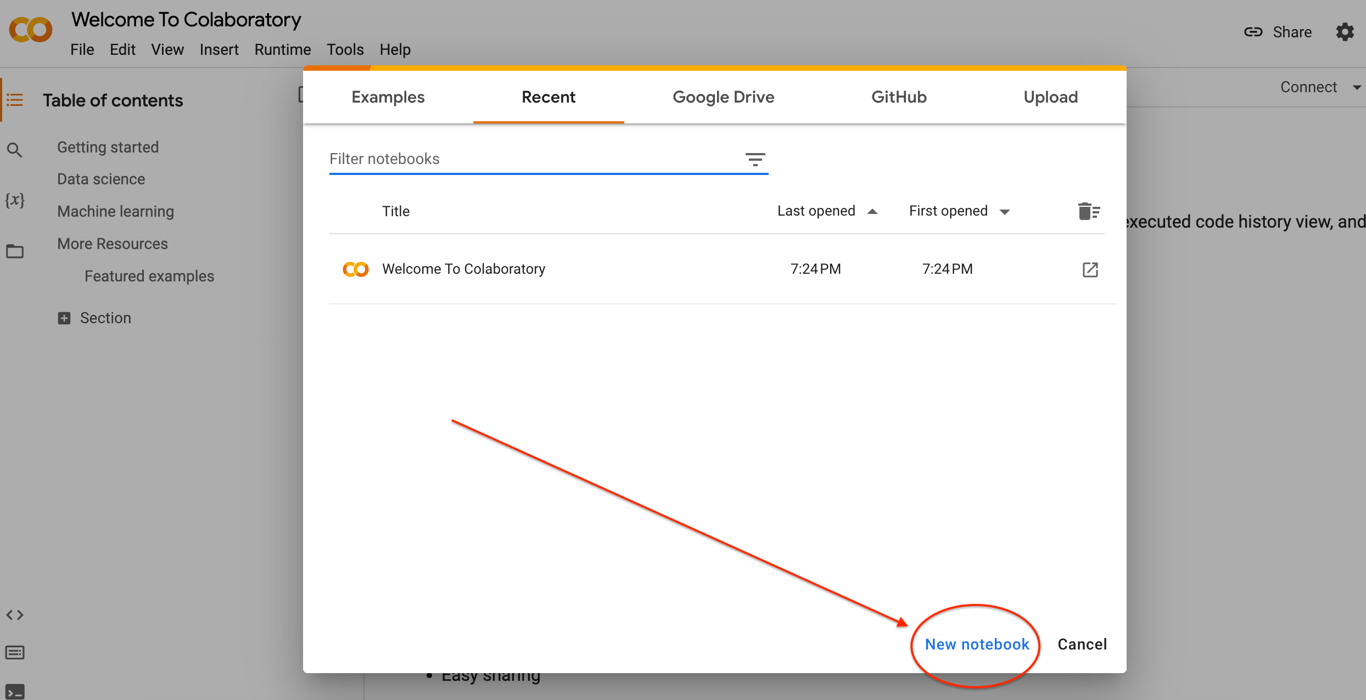
Click “New Notebook.”
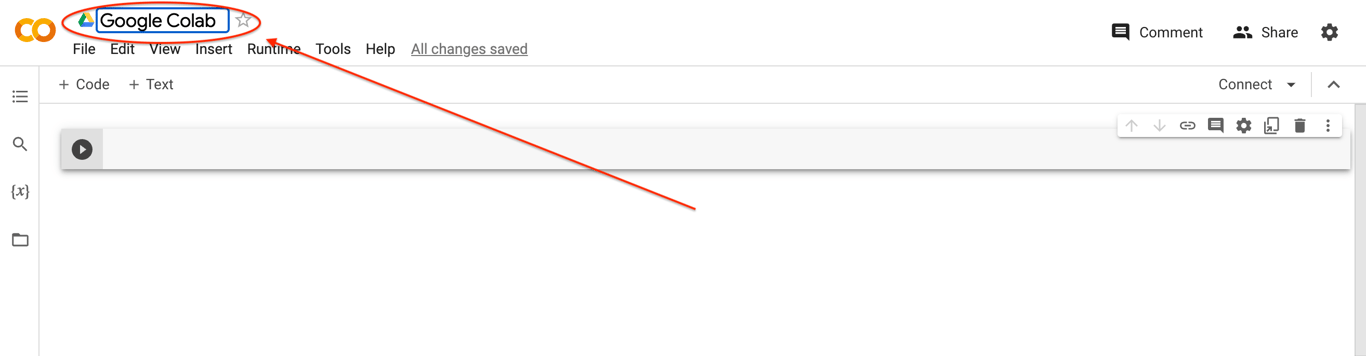
Give your Colab notebook a title.
AI Assistance
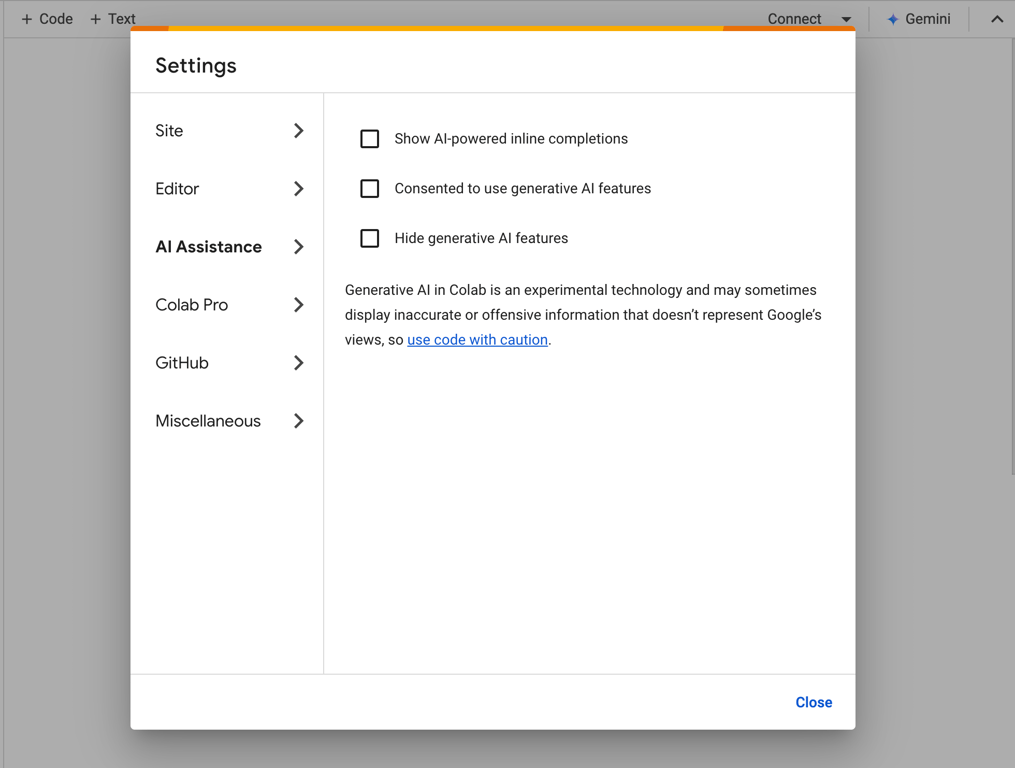
Before we get started with writing code, we're going to disable the built-in AI Assistance tools in Google Colab. Select Tools from the menu bar and then select Settings. Navigate to the AI Assistance panel and uncheck the boxes. You'll have the option to change the settings and use these tools later, but as you're getting started, it's helpful to rely on your own understanding first!
👩💻 Using Google Colab
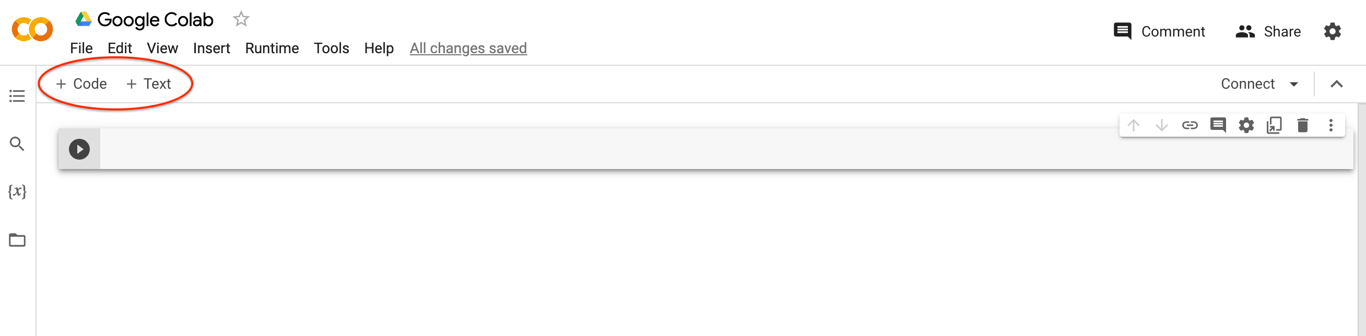
Colab has two types of cells: text and code.
💬 Text Cells
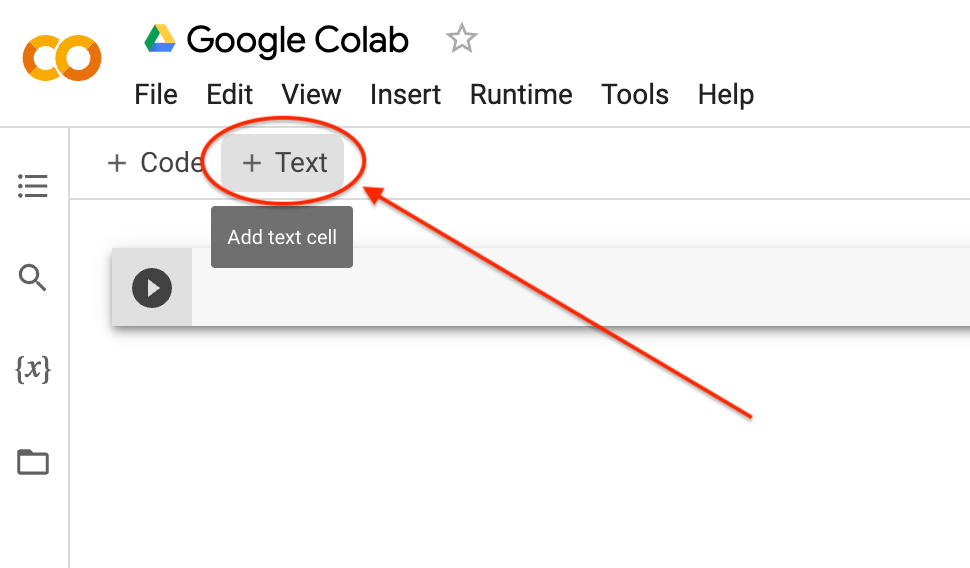
Click “Text” to add a text cell.
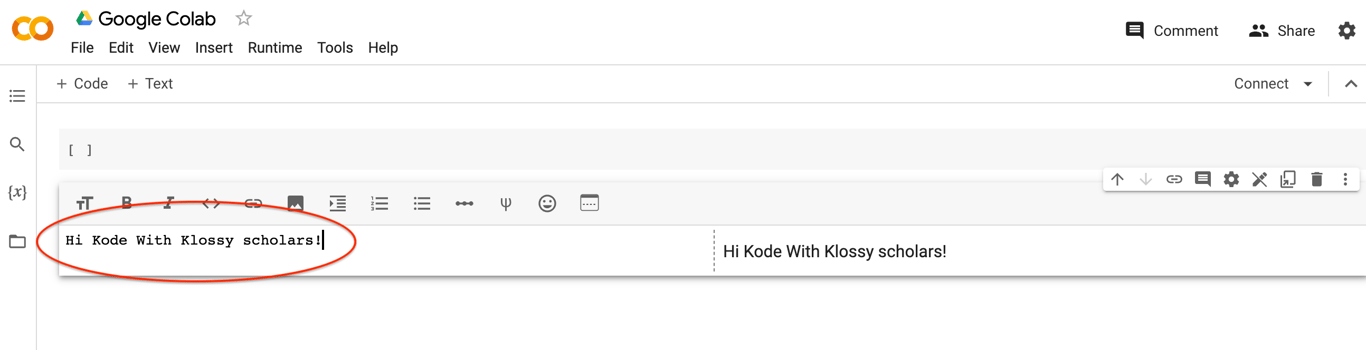
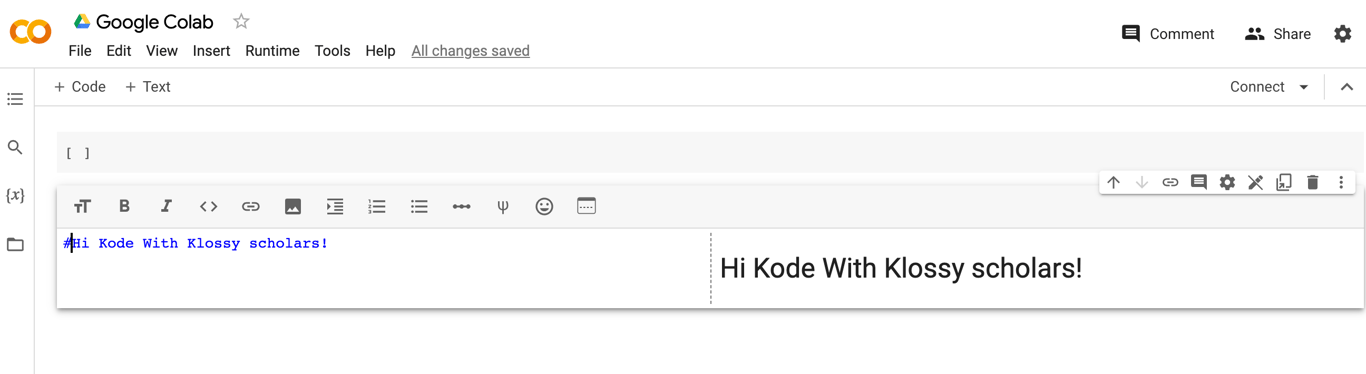
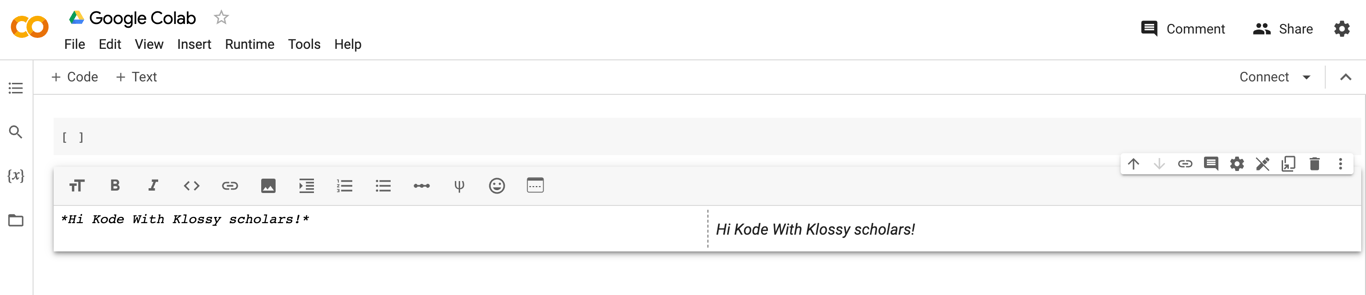
Textcells are formatted using a simple markup language called Markdown. When you write text in the Markdown source (left), you can see what it will look like in the rendered version (right). Above the Markdown source, there is a toolbar to assist editing.
If you click outside of the text cell, you will see only the rendered version. Double-click the text cell to see the Markdown source again.
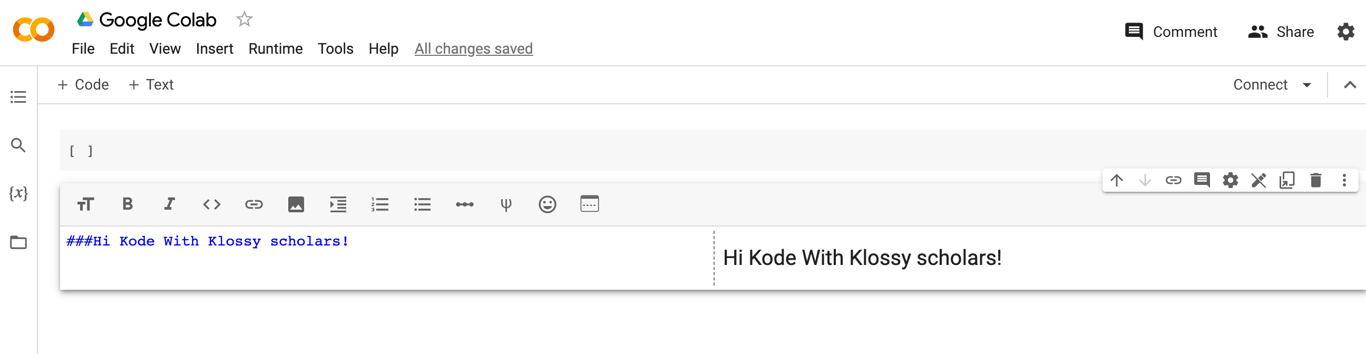
Headers are created using #. Use multiple ### for less emphasis.
💡
Fun Fact: Can you guess the name of the # symbol? Find out here!
Here is the size of text followed by one #.
Here is the size of text followed by three ###.
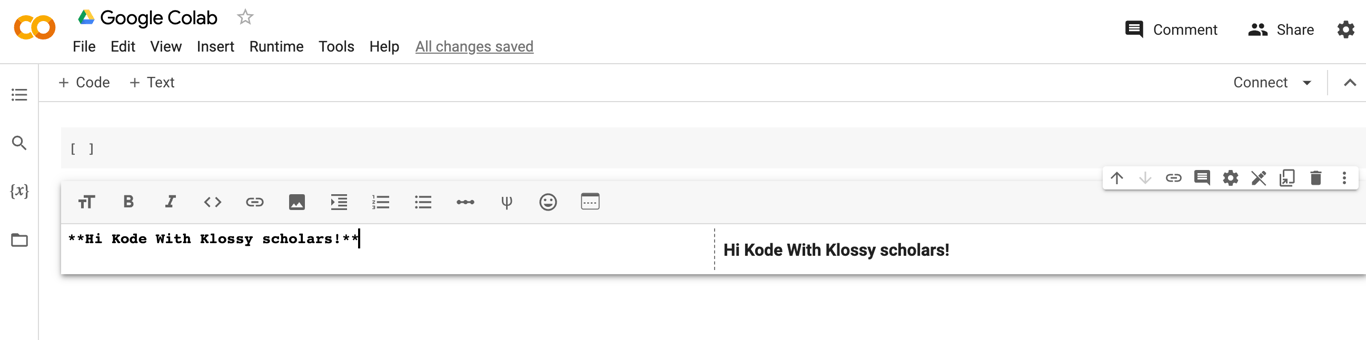
To make text bold surround it with **two asterisks**.
To make text italic use a *single asterisk* or _underscore_.
✏️
Try-It | Common Markdown Elements
Now that you've seen some of the basic Markdown elements in action, you can try it for yourself! Check out this resource before completing the steps below.
Create an ordered list of your favorite foods.
Write an unordered list of your friends' names.
Insert a link to a coding resource you like.
Create another Markdown element from the resource provided!
💻 Code Cells
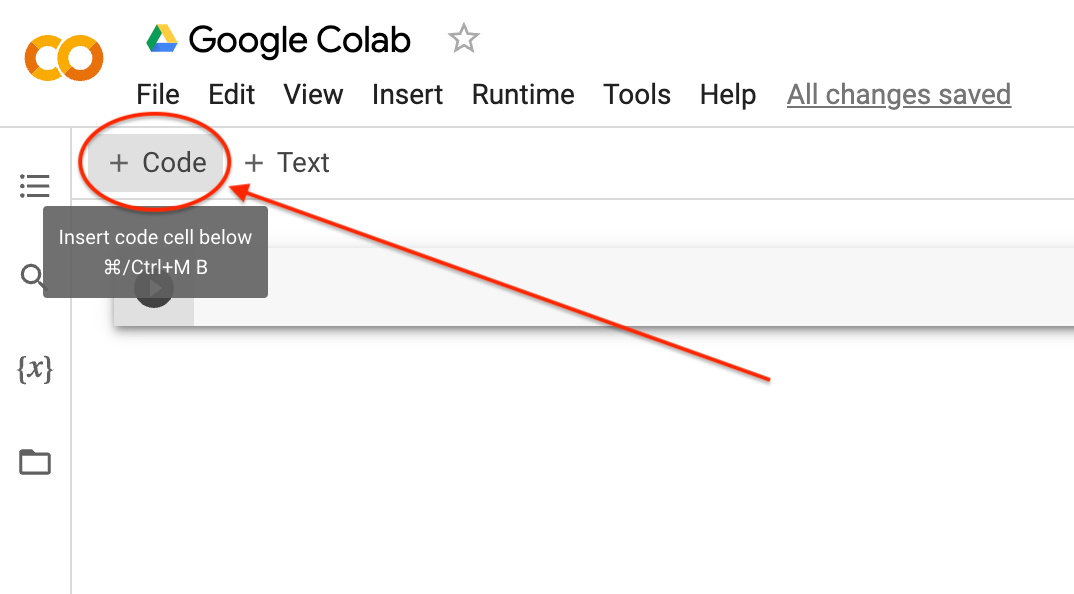
Click “Code” to add a code cell.
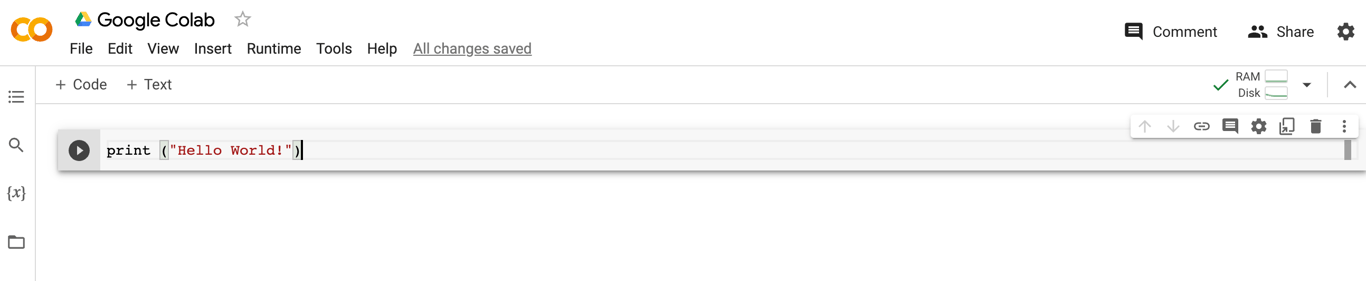
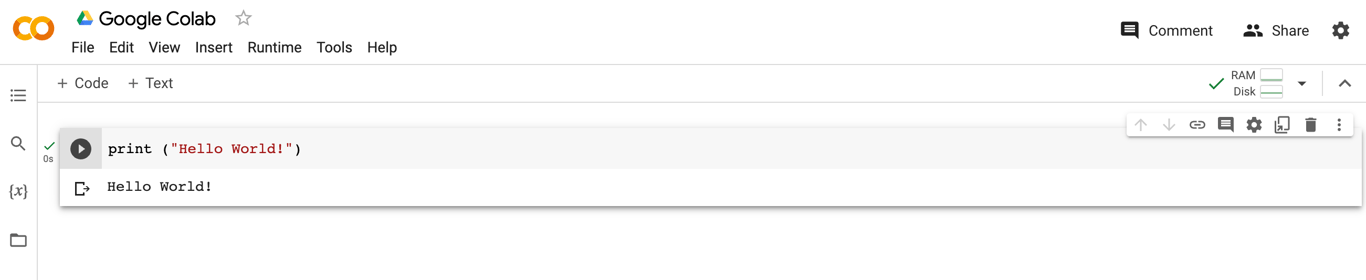
You can use code cells to write Python code. Let’s try it! Type print ("Hello World!") into your code cell.
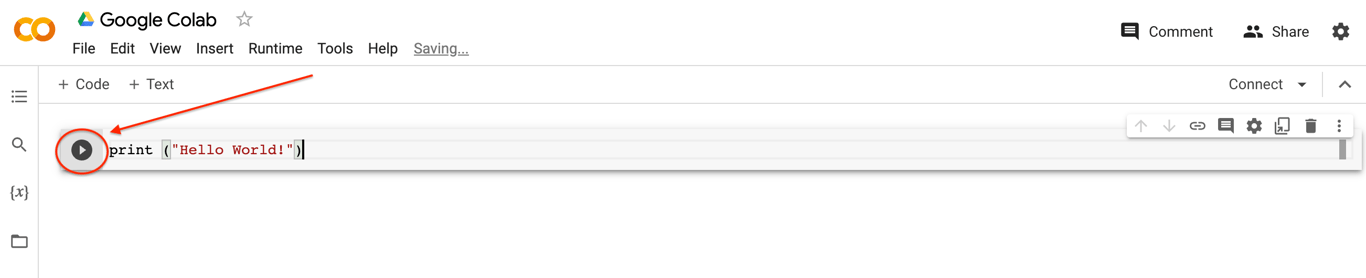
Press the play button to run your code, or you can press “Shift” then “Enter” or "Return" on your keyboard.
You did it! You wrote and ran a line of code in Python! 🎉
💡
Tips & Tricks
Run (or “execute”) each cell in order. You can edit & re-run cells if you would like! Sometimes though, editing and re-executing could have unintended consequences. If you encounter this problem, reset your environment:
Click “Runtime.” Then click “Restart runtime” to reset the currently running code cell.
Click “Runtime.” Then click “Restart and run all” to reset the Colab image and get you back to a 100% clean environment.
You can also clear all output in the Colab by clicking “Edit” and then “Clear all outputs.”
Comments: A hash sign # in a code block begins a comment. All characters after the # and up to the end of the physical line are part of the comment and the Python interpreter ignores them. It’s like a note or reminder that programmers leave for themselves or others who read their code. It's written in plain English and doesn't affect how the program runs. Comments help explain what the code does, making it easier to understand and work with, so we’d highly recommend getting into the habit of writing comments!
# This is how you write a comment
✏️
Try-It | Text & Code Cells
Continue working in the same Colab notebook to complete the following tasks:
Create a text cell with notes about things you want to remember from this lesson. Include text that is bold, italicized, different font sizes, or organized in lists!
Create a code cell and print() an encouraging message to yourself. Run the code cell to see the output below the code!
🌎 What is Python?
Python is a programming language first released in 1991 by Guido van Rossum and is one of the most popular languages used in computing today. Python is most often used in web development to create applications. Some of the more popular websites and applications that run on Python (at least partially) include: Google, YouTube, Facebook, Instagram, Reddit, and Dropbox!
Python is also extremely popular in the AI community because it is a general purpose language which makes it easy to collaborate with all types of computer scientists through its simple syntax. People choose to use Python so that they can communicate easily with other people!
💻
Use this template to follow along with the Try-It and Practice exercises throughout this lesson!
🤔 Why Python for AI/ML?
Why should I use Python for Artificial Intelligence (AI) and Machine Learning (ML)?
That’s a great question! Python is super popular for AI and ML because:
It's Easy to Learn: Python's like speaking English compared to other programming languages. It's straightforward and simple, which makes it a breeze to pick up and start coding.
Loads of Cool Tools: Python has a ton of libraries (think of them as ready-made tools) that make building AI and ML programs easier. Imagine having a giant toolbox full of gadgets that you can just grab and use whenever you need them, rather than building them from scratch.
You Can Do Anything: Python isn't just for AI and ML; you can use it for all sorts of cool stuff, like making games, building websites, or even controlling robots! It's like a Swiss Army knife for coding.
🐍 Basic Python Concepts
Now let's delve into some fundamental Python concepts:
🔢 Data Types
Throughout this camp, you will learn about several different Python data types. A data type is a specific kind of information or data. Based on the type of data we write in our code, the program will interpret it differently. In this lesson, we will cover three data types: strings, numbers, and booleans.
🧶 Strings
Strings represent values that are characters, words, or any other type of text. You can think of a string as a series of characters (alpha, numeric, spaces, and special characters) between two quotation marks. An example is a person's first name or the title of your favorite book:
# String Example

"Karlie Kloss"

'Data Feminism'
In Python, strings can be either double-quoted (“like this”) or single-quoted (‘like this’).
print()
If we want to run the cell and have it return what we wrote, we can use the print function.
# Print out the following text
print('Hi, Kode With Klossy')
You should see “Hi, Kode With Klossy” appear as the output of the code above. The output will appear below the code cell.
✏️
Try-It | Strings
Create a new code cell. Inside the cell, type print("<your first name>"). Instead of the words "your first name", type your actual name! Be sure to include the quotes!
Type print("<the last thing you ate>").
Type print("<your full name>").
Type anything you want inside of the () after print. Try to use some characters from your keyboard that are not numbers or letters.
🌶️ Mild Challenge: Look up how to make your strings all lower or uppercase!
✨✨ Don't forget to run your code by clicking the play button. ✨✨
✉️ Variables
Variables allow us to store information that can later be used in an expression. To define a variable in Python, we must first state the name we want our variable to have. To assign a value to that name, we must use the "Assignment Operator" which is denoted by the equal (=) symbol. Finally, on the right-hand side of the equal sign (=), we give a value we want our variable to hold!
💡
Note: You can use any word to name your variable. However, there are specific keywords that are reserved in Python that cannot be used as variable names. Check out this link for a full list of Python's reserved words. There are also specific rules for naming variables that can be found here.
# Variable example
dog = "fluffy"

print(dog)
# Variable example 2
favorite_food = "pizza"

print(favorite_food)
In Python, when naming variables with more than one word, we use a convention called snake_case, where words are separated by underscores (e.g., favorite_food). While your code won’t break if you don’t use snake_case, other Python developers might find it unusual. Different programming languages have their own naming conventions—like camelCase (used in languages like JavaScript) and kebab-case (often used in URLs). But in Python, snake_case is the standard!
✏️
Try-It | Strings and Variables
Complete the following in a new code cell. After you type the code, make sure to run it!
Declare a variable storing a string for each prompt below. Print each variable to see the output!
A variable that holds your favorite food (e.g., favorite_food = "tacos")
A variable called pet that holds the name of a pet
A variable called school that holds the name of your high school
A variable called goal that holds one of your goals. Remember, you can include spaces (and even special characters) in a string!
🌶️ Mild Challenge: Print one of these variables as part of a longer sentence. Hint: Look up string interpolation!
String Methods
String methods in Python are built-in functions that allow you to manipulate and work with text. By using these methods, you can clean up, format, and analyze text data efficiently, which is especially helpful when working with messy or inconsistent information. Three common string methods include:
lower()
strip()
replace()
There are many more Python string methods, but we’ll start with these for now. Before we explain how these work, let’s see them in action!
✏️
Try-It | String Methods
Run the code snippet below and observe the output. Be prepared to share your responses to the following questions.
What does lower() seem to do?
How does strip() change the text?
What happens when you use replace()?
How do these methods work together in cleaned_text?
The lower() method converts all letters in a string to lowercase. This is useful when comparing text or when you want to standardize text.
The strip() method removes any spaces, tabs, or newlines from the beginning and end of a string. This is helpful when cleaning up user input to remove accidental spaces before or after names.
The replace() method swaps out parts of a string for something else. This is useful when standardizing text or removing special characters from text.
With these built-in Python string methods, you’re ready to handle messy text like a pro!
Raw text is often messy and inconsistent. Unlike humans, computers don’t naturally understand language—they depend on clean, well-structured data to identify patterns and make accurate predictions. Because of this, it's common to remove unnecessary words and punctuation when preparing text for AI models. This helps the model focus on the most important words in a sentence. Let’s test your new knowledge of Python string methods with another Try-It exercise!
✏️
Try-It | Clean Up Messy Text
Use Python string methods to clean up this messy text. Remove extra spaces from the beginning and the end of the string, convert all letters to lowercase, and remove all punctuation!
messy_text = " HeLlO, wOrLd! "
🔢 Numbers
Python has several data types to represent numbers, including integers and floats.
Integers are used to represent whole numbers (ex. 50)
Floats are used to represent fractional or irrational numbers (ex. 3.14)
# Integer Example
print(10)

# Float Example
print(5.5)

# This is a string (not a number) because it has quotation marks. Python will treat this like a word, not a number.
print("15")
If we want to convert a float to an integer, we can pass our value to the int function. Similarly, if we want to convert an integer to a float, we can pass our value to the float function.
# convert float to integer
int(1.999)

# convert integer to float
float(4)
The code above will turn the float (1.999) into an integer (1). Similarly, the integer (4) will now include a value after the decimal (4.0).
If we want to convert a number into a string, we can pass our value into the str function.
# convert float to string
str(1.999)
The program will now treat 1.999 as a string instead of a number. In which case, you could no longer perform math operations with this value.
➗ Python as a Calculator
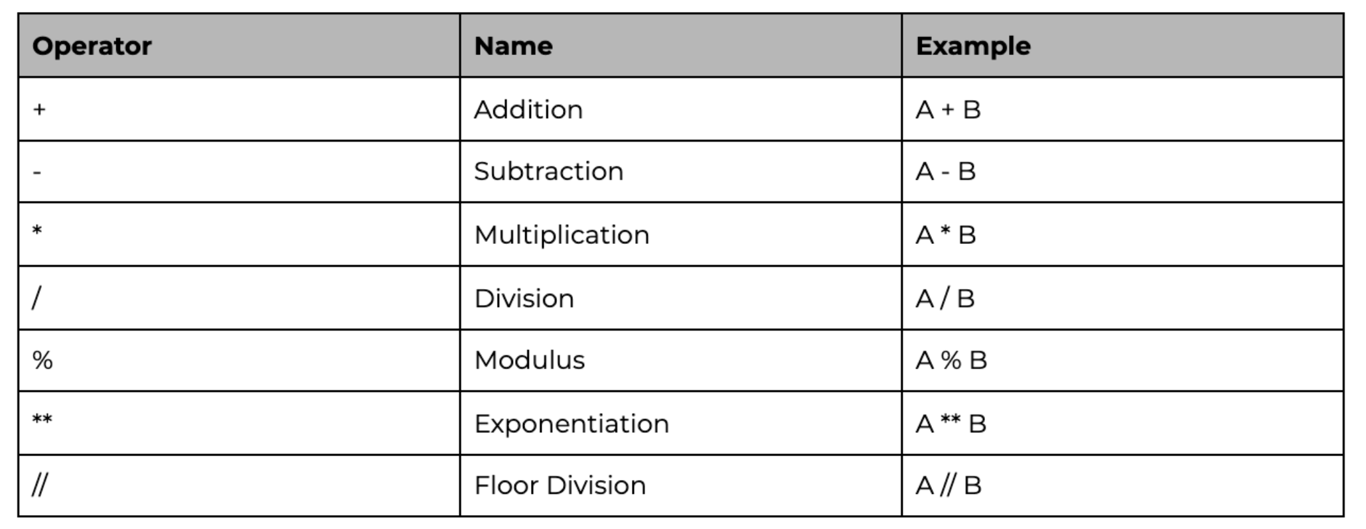
Python is perfectly suited to do basic calculations. Apart from addition, subtraction, multiplication, and division, there is also support for more advanced operations.
✏️
Try-It | Numbers
Run the code below to see the answers to the following calculations:
Booleans (pronounced boo-lee-ehn-s) represent either a True or False value. We can use booleans to represent real-world dichotomies such as:
Yes or No
Correct or Incorrect
Left or Right
On or Off
is_member = True
print(is_member)
This statement will return the boolean value True.
When you compare two values, the expression is evaluated using Boolean comparison operators, and Python returns a Boolean answer:
print(20 > 10)
print(100 == 50)
print(10 < 5)
These statements will return True, False, False.
A combination of boolean expressions can create more complex comparisons. To combine boolean values we can use the "Boolean Operators" and, or, and not. Let's imagine a gym offers its members four sessions with a personal trainer per month. The code snippet below demonstrates how to combine boolean expressions to determine if a user is still eligible for more personal training sessions this month.
The print statement will return False. Even though is_member is assigned to True, the and operator requires that both parts of the expression evaluate to True in order to return Truefor the entire expression. In this case, the comparison pt_sessions < 4 evaluates to False, so the return value is False.
🎁 Containers
A container is a data structure that holds multiple pieces of data in a single object. In this lesson, we will learn about two collection data types: lists and dictionaries.
📜 Lists
A list is one of the most versatile data types available in Python. It is a data type that can contain any number of items of any data type. To define a list, we use square brackets [], and each item must be separated by a comma. Each item in a list can be of a different type which means that a list is not constrained to only containing a collection of one data type.
empty_list = []
print(empty_list)

# You can also use the list function to create a list.
empty_list = list()
print(empty_list)
More examples of lists:
# List containing only string types
food = ['pizza', 'sushi']

# List containing only numbers
numbers = [20,10,5]

# List containing multiple types
multitype = ['pasta', 100, 1.25]
Accessing Items in a List
The position or location of an item in a list is known as its index. It is important to know that the index of a list must be an integer value, and the first value in a list has an index of zero. For example, the first item lives at position zero, the second item lives at position one, and so on. To access an item, we can specify its index by calling the list name and denoting the index operator [].
# Creating a list of colors
colors = ['blue', 'pink']

# printing item in list based on index
print(colors[0])
print(colors[1])
The first print statement will return blue. The second print statement will return pink.
Slicing
Slicing a list gives us another list that is a subset of the original list, instead of just one single element. The basic syntax for slicing is array[start:stop:step]. The slice creates and returns a new list from the index start up to (but not including) index stop. The step is 1 by default, meaning every element is included, but can be modified to skip elements.
# create a list
letters = ['a', 'b', 'c', 'd', 'e','f']

# slice out the first 2 elements (elements at index 0 and 1)
print(letters[0:2]) # -> ['a', 'b']

# slice out the middle 2 elements
print(letters[2:4]) # -> ['c', 'd']

# take the last 2 elements (starting at index 4 to the end of the list)
print(letters[4:]) # -> ['e', 'f']

# can also use the negative indices for slicing
print(letters[-2:]) # -> ['e', 'f']

# print every other element
print(letters[::2]) # -> ['a', 'c', 'e']
Slicing and Indexing on Strings
Indexing and slicing work identically with strings. We can pull out certain characters from a string to create a substring!
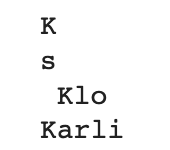
my_string = "Karlie Kloss"

# Pull out the first character of the string
print(my_string[0])

# Pull out the last character of the string
print(my_string[-1])

# Creating a substring of only some characters
print(my_string[6:10])

# Creating a substring of only some characters
print(my_string[-12:-7])
The output of the code above looks like this:
List Operations
Lists can contain any number of items. Due to this fact, we do not want to create a new list every time we want to make a change, as this could be very expensive in computation time. To make updating lists easier, Python allows lists to be mutable, meaning that we can modify the original list at any given time.
To update a list, we can use different list methods, such as append or pop. The append method will add an item to the end of a list while pop will remove the item at a given index.
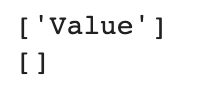
# Add an item
my_list = []
my_list.append('Value')
print(my_list)

# Remove an item
my_list.pop(0)
print(my_list)
The output of the code above looks like this:
As you can see in the example above, we used two different list methods to update our list. Let's unpack the syntax behind our example. If we translate our code into English terms, it would read as followed:
Append the string "Value" to the list stored in the variable called "my_list"
To properly use a list method, we must specify the following:
The name of the list we intend to update
a . to show that we are using a method to update the list
The name of the method we want to use and the appropriate parameters:
If using the append method, include what we are adding to the list in quotation marks.
If using the pop method, include the index of the item we are removing.
💡
Check out this link to see all of the available list methods and their required parameters
✏️
Try-It | Lists
Create a new, empty list called scholars.
Append your name to the list as a string.
Append the following names as strings (in order):
Karlie
Serena
Miley
Ariana
Selena
Sort the list, then print the list to view the newly sorted list. Hint
Reverse the list, then print to view the reversed list. Hint
Add an additional person to the list, then print the updated list.
📚 Dictionaries
A dictionary is a data type that is similar to a list, but instead of storing data by position, it stores data by name. Storing data by name establishes the ability to have an extremely fast lookup time, as we do not have to iterate over the collection of data to search for the value we are looking for.
We define an empty dictionary using curly brackets {}
empty_dictionary = {}
Items in dictionaries are in the form of key-value pairs. A key is a name, and a value is the content connected to that name. To define a dictionary we need to write something like:
my_dictionary = {'key1': 1, 'key2': [1,2,3]}
In the example above, key1 and key2 are the keys, and 1 and [1,2,3] are the values.
The keys in a dictionary can be any immutable data type, but they must be unique. Keys are generally primitive types, such as strings or numbers. The values can be any data type, including lists, as shown above.
Instead of using an index number to access values in a dictionary, we use the key for the value we want to reference. By default, dictionaries do not structure their content in any particular order.
# Access Data in a Dictionary
scholar_hometowns = {"Karlie": "Chicago", "Serena": "Los Angeles"}

print(scholar_hometowns["Karlie"])
The output of the code above is Chicago.
type(scholar_hometowns)
The output of the code above is dict.
If we want to update our dictionary to store an additional value, we can use the assignment operator = after we have indicated the specific key we want to add or update.
In our example above, let's say that there was a typo with Serena's hometown, and we want to update our dictionary to contain the proper value for Serena's hometown.
To update our hometown dictionary to have an additional key-value pair, we can do the same as above, except we index with a new key instead of using an existing key.
In programming, a nested data structure is a data structure that contains other data structures inside it. Think of it like a backpack that holds smaller pouches, each containing different supplies. Two common types of nested structures include:
Lists of lists – a list where each element is also a list
Dictionaries with nested structures – a dictionary where some values are also dictionaries (or lists)
Lists of Lists
Imagine you’re organizing your favorite playlists. Each playlist is a list of songs and all of your playlists are organized in a single list. Let’s take a look at an example!
playlists = [
	["Enchanted", "Cool", "Feather"],
	["Shake It Off", "Physical", "Espresso"],
	["Love Story", "New Rules", "Thumbs"]
]
The playlists list has three elements, each one a list of songs on a playlist! If you want to access a specific song from this list, you need to select playlist first and then the song. For example, to access “Espresso”, use playlists[1][2].
Dictionaries with Nested Structures
Now, let’s imagine a Spotify user profile that includes their username, saved playlists, favorite artists and listening stats.
Nested data structures are everywhere in the real world, helping apps and websites keep things organized behind the scenes. Think about your favorite music streaming app—it needs to track your profile, playlists, favorite artists, and listening history, all neatly stored in a way that makes sense. Social media works the same way, with each user having a profile, a list of friends, and posts that contain comments and likes. Even online shopping relies on nested data—your shopping cart isn’t just a list of items; each item has details like price, size, and color choices. By using nested structures, programmers can keep everything structured and easy to access, making apps faster, smarter, and more personalized for you!
✏️
Try-It | Nested Data Structures
Using the user_profile dictionary above, figure out how to access the following values. Remember to use print() to see the output!
The user’s subscription type.
The total minutes the user has listened to music.
The first song in the Throwbacks playlist.
The second artist in their top_artists list.
Now that we’ve covered the basics of Python data types and data structures, let’s practice these new skills! If you finish the practice early, make sure you check out the Extensions below.
📝
Practice | Data Types & Containers
Create a new code cell block to complete the exercises below.
Create a dictionary called me that contains the following key-value pairs:
"name": where the value is your name as a string
"age": where the value is your age as a integer
Print your name from the dictionary.
Add a new key-value pair to your me dictionary, where the key is the string "hobbies" and the value is an empty list.
Append a hobby (or two!) as a string to your hobbies list.
🌶️🌶️🌶️ Spicy Challenge: Use your online sleuthing skills to learn about string interpolation. Print the statement "My name is [YOUR NAME]" by combining a string with your dictionary!
🤖 AI Connection
If you encounter an error message you don't understand, try copying it into an AI tool with the prompt: "I'm a beginner learning Python. Can you explain what this error message means and give me a hint about how to fix it without writing the code for me?" Understanding error messages is one of the most important skills a programmer can build, and AI is a great tool for translating them into plain language.
Extensions
🌶️ Mutability
All data types in Python are either mutable or immutable, meaning that they can or cannot be modified after they have been created. The general rule is that simple data types are immutable while more complex data types are mutable. An example of an immutable type is a string or a number. Something that can be more complex in structure is a list, making it a prime example of a mutable data type.
💡
It is important to note that mutability does not affect variables; it only affects values stored inside variables.
Immutable Types
When we store an immutable type, the value itself is stored in the variable. However, due to its immutability, we cannot change that value. We can only change the value of the variable by setting it to a new value.
my_str = 'abc'

#let's say I want to change my_str to be 'adc'
my_str[1] = 'd'
The output of the code above will be an error statement.
# I can only do that by redefining what my_str is
my_str = 'abc'
my_str = 'adc'
print(my_str)
The output of the code above is adc.
Mutable Types
When we store a value in a variable, that value is given an address that references its location in Python memory. To access a mutable type, Python will use this address to locate our data where we can retrieve or update the current value. When modifying a mutable type, the change occurs directly on the value instead of creating a new value as immutable types do.
my_list = [1, 2, 3, 4, 5]
print(my_list)

# we can change what is stored in my_list
my_list[1] = 'new item'
print(my_list)
The output of the code above looks like this:
# we can also change the list by using a method
my_list.append(3.14)
print(my_list)
The output of the code above looks like this:
Tuples
Another container in Python is the tuple. This is an immutable version of the list, meaning we cannot change the tuple once it has been set. Tuples are defined with parentheses ().