
🎯 Learning Goals
- Explain the purpose of conditional statements and loops in Python
- Write Python
if,elifandelsestatements
- Use Python
forandwhileloops to repeat tasks
- Apply conditionals and loops to solve problems
📗 Technical Vocabulary
- Conditional statement
- Comparison operators
- Logical operators
- For loop
- While loop
Warm-Up | Crack the Code!
Imagine you’re a secret agent trying to break into a high-security vault. The vault is locked with a 3-digit secret code, and you need to figure out what it is! After each attempt, I’ll give you a hint: I’ll tell you if your guess is too high or too low until you crack the code.
What’s the best strategy here? Should you guess randomly? Should you start at 000 and count up? Or is there a smarter way to narrow it down?
How could we write a Python program to do this automatically? Up until this point, our Python code runs top-to-bottom and only once! In this example, we need to repeatedly give the user feedback based on their guess. The feedback also changes based on their guess. If the guess was too high or too low, we tell them “Higher” or “Lower,” but if it’s correct, we should tell them, “YOU WIN!”
In this lesson, you’ll learn how to modify your Python programs to only run the code if a condition was met. You’ll also learn how to repeat the same action over and over until a condition is met. All of the tools you’ll learn today allow you to control the flow of the program. Instead of running every line of code top-to-bottom and only once, your program will be more dynamic and efficient! Ready? Let’s dive in!
Conditional Statements
A conditional statement in programming is a way for a program to make decisions based on specific conditions. It allows a program to execute different blocks of code depending on whether a condition is True or False. Check out the syntax below in the example below.
age = 17

if age >= 18:
    print("You can vote!")
else:
    print("You are too young to vote.")
Would this conditional statement print “You can vote!” or “You are too young to vote.”? How could we modify the code to see the other output?
‼️ Notice the colons and indentation in this example! As we begin to write more complex Python code, be sure to follow these patterns to avoid syntax errors.
Comparison Operators
Comparison operators are used to compare values and evaluate them as a single Boolean value of either True or False.
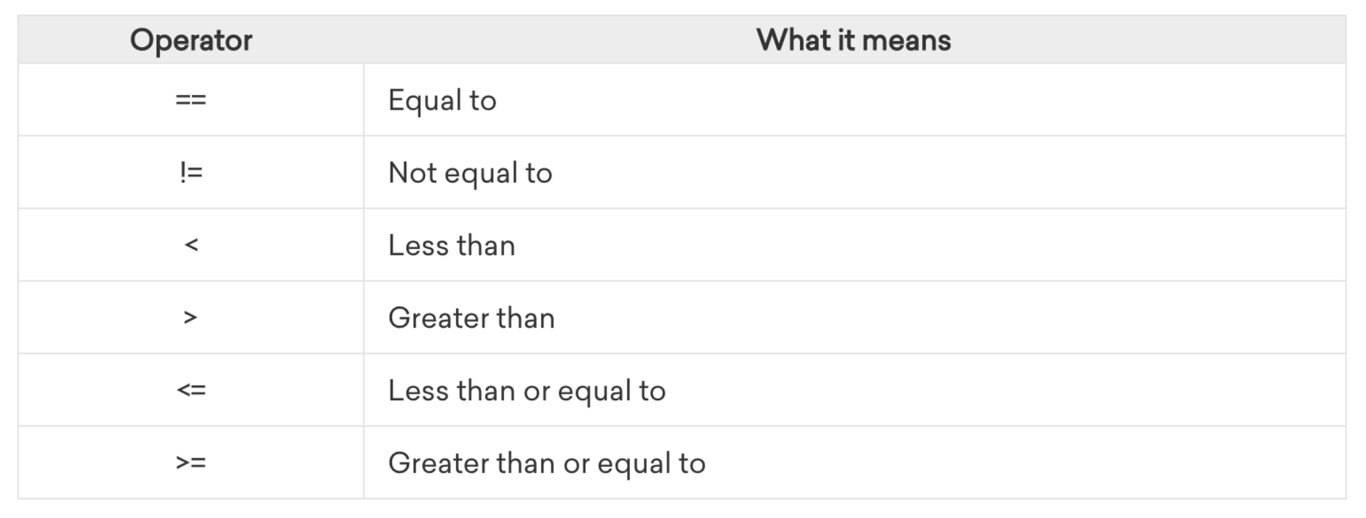
To understand how these operators work, let’s assign two integers to two variables in a Python program:
x = 5
y = 8
In this example,
x has the value of 5 , and y has the value of 8. Therefore, the value of x is less than the value of y.Using these two variables and their associated values, let’s practice with the operators from the table above. In our program, we will ask Python to print out whether each comparison statement evaluates to
True or False.x = 5 y = 8 print(x == y) print(x != y) print(x < y) print(x > y) print(x <= y) print(x >= y)
Use this template to follow along with the Try-It and Practice exercises throughout this lesson!
Try-It | Comparison Operators
Before running the code above in your Colab notebook, make a prediction about which statements Python will evaluate to be
True and which statements Python will evaluate to be False.if, elif, and else Statements
Let’s work through an example together. Create a new code cell and complete the following exercise.
Code-Along | Conditional Statements
Write a Python program that determines the price of a movie ticket based on the user’s age. The program should output the corresponding ticket price based on the following rules:
- Children (under 12 years old) pay $8
- Teenagers (12 to 17 years old) pay $10
- Adults (18 to 64 years old) pay $12
- Seniors (65 and older) pay $8
Try-It | Conditional Statements
Write a Python program that determines a shopper’s discount. The more they spend, the bigger the discount.
- If they spend $50 or more, they get 10% off.
- If they spend $100 or more, they get 20% off.
Use conditional statements to print the shopper’s total cost.
Logical Operators
Logical operators are used in conditional statements to combine or modify Boolean values (
True or False). They help control the flow of a program by allowing more complex decision-making.1️⃣
and (Logical AND)- Returns
Trueonly if both conditions areTrue.
- Returns
False, if at least one condition isFalse.
age = 16
has_permission = True

if age >= 13 and has_permission:
    print("You can create a social media account.")
else:
    print("You cannot create a social media account.")
2️⃣
or (Logical OR)- Returns
Trueif at least one condition isTrue.
- Returns
Falseonly if both conditions areFalse.
is_raining = False
will_rain = True

if is_raining or will_rain:
    print("You should bring an umbrella today!")
else:
    print("You do not need an umbrella today.")
3️⃣
not (Logical NOT)- Reverses the boolean value:
not True→Falsenot False→True
is_logged_in = False

if not is_logged_in:
    print("Please log in to continue.")
Code-Along | Logical Operators
Let’s revisit the movie ticket pricing example and use logical operators to explicitly define the lower bounds for each condition.
Challenge: Did you notice that the cost for people under 12 and people 65 or older is the same? How could you use the logical OR operator to combine these conditions?
Try-It | Logical Operators
Write a Python program that determines whether a driver qualifies for a discount when renting a car.
1️⃣ The driver must be at least 25 years old to rent a car.
2️⃣ If the driver also has a good driving record, they qualify for a discount on the rental.
Instructions:
- Define two variables in your code:
age→ Set this to a sample age (e.g.,30).good_driving_record→ Set this toTrueorFalse.
- Use conditional statements and the logical
andoperator to check both conditions.
- Print appropriate messages based on the driver's eligibility.
Loops
Loops in Python are used to execute a block of code multiple times without having to write it repeatedly. They help automate repetitive tasks, making programs more efficient.
1. for Loop (Iterating Over a Sequence)
- Used when you know how many times you need to loop.
- Iterates over a sequence (like a list, tuple, string, or range).
Example: Counting from 1 to 5
for i in range(1, 6):
    print(i)
Output:
1
2
3
4
5
👉
range(1, 6) generates numbers from 1 to 5 (6 is excluded).Example: Iterating Over a List
fruits = ["apple", "banana", "cherry", "date"]

for fruit in fruits:
    print(fruit)
Output:
apple
banana
cherry
date
👉 The variable
fruit takes on the value of each item in the list, one at a time.2. while Loop (Repeating Until a Condition is False)
- Used when you don’t know how many times the loop will run.
- Continues looping as long as the condition is
True.
Example: Counting down from 5
count = 5

while count > 0:
    print(count)
    count -= 1  # Decrease count by 1 each time
Output:
5
4
3
2
1
👉 The loop runs while
count > 0, and stops when it reaches 0.Example: User Input with while Loop
correct_password = "python123"
user_input = ""

while user_input != correct_password:
    user_input = input("Enter the password: ")

    if user_input == correct_password:
        print("Access granted! ✅")
    else:
        print("Incorrect password. Try again. ❌\n")
Example Output:
Enter the password: abc
Incorrect password. Try again. ❌

Enter the password: hello123
Incorrect password. Try again. ❌

Enter the password: python123
Access granted! ✅
👉 The
while loop runs as long as the user’s input is not equal to "python123".When to Use Each Loop?
Loop Type | Best Used When... |
for loop | You know the number of repetitions or you're iterating over a sequence (list, string, range, etc.). |
while loop | You don’t know how many times it will repeat and it depends on a condition. |
Try-It | Loops
- Write a program that loops through a list of numbers and finds the largest number in the list. For example, given the list below, the output should be 13. Hint: Start by looping through the list and printing each number. Then find a way to keep track of the largest number!
numbers = [5, 10, 3, 7, 12, 8, 13]
- Write a program that keeps asking the user to input a word until they type
"stop". Hint: Use the input() method we saw in an example!
Nice work! We can solve the first exercise with a
for loop because we know how many times to loop – the number of elements in the list. We solved exercise 2 with a while loop, because we didn’t know how many times the user would type a word before they type "stop"!Try-It | Loops & Nested Data Structures
Use this
gamers dictionary to complete the following exercises.gamers = { "Nasreen": { "favorite_game": "Fortnite", "hours_per_week": 10 }, "Sophia": { "favorite_game": "Minecraft", "hours_per_week": 15 }, "Kourtney": { "favorite_game": "The Sims 4", "hours_per_week": 8 } }
- Write a program that loops through the
gamersdictionary and uses interpolation to print a sentence about each gamer, including their name and their favorite game. For example, “Nasreen’s favorite game is Fortnite!”
- Write a program that loops through the
gamersdictionary and calculates the total number of hours all players spend playing games per week.
Remember, to access a value in a dictionary, we use the key associated with the value in square brackets. For example, in the gamers dictionary, we use
gamers["Sophia"]["favorite_game"] to access the value "Minecraft".Practice | Python Conditional Statements and Loops
- Find the sum of all values in a list. Create a Python program that calculates the sum of all numbers in a given list. Use a
forloop to iterate through the list and add each number to a total sum. Print the final sum after the loop completes.
Example Input:
numbers = [3, 7, 2, 9, 5]
Expected Output:
Sum of all numbers: 26
- Remove empty lists from a list. A group of friends is playing darts, and their scores for multiple rounds are recorded in the
dart_scoreslist shown below. Some players might have missed all rounds (represented by empty lists). Loop through the list and keep only the non-empty lists.
dart_scores = [[50, 20, 30], [], [15, 25, 40], [], [60, 45]]
Expected Output:
non_empty_scores = [[50, 20, 30], [15, 25, 40], [60, 45]]
- "Crack the Code" Game – Recreate the Challenge! Remember the Crack the Code exercise from the beginning of this lesson? Now you have the skills to write the full program!
- Set a static two-digit secret code (e.g.,
86). - Use a
whileloop to keep asking the user for a guess. - Use conditional statements (
if,elif,else) to give feedback: - If the guess is too low, print
"Too low! Try again." - If the guess is too high, print
"Too high! Try again." - If the guess is correct, print
"You cracked the code!"and end the loop. - Modify your program so the player only gets 5 attempts to guess the code.
- If they run out of attempts, print
"Game over! You've run out of guesses."and stop the game.
🌶️ Challenge: Limit the Number of Guesses
🤖 AI Connection
If your program isn't behaving the way you expect, try describing the problem to an AI tool: "My Python program is supposed to [WHAT YOU WANT IT TO DO], but instead it [WHAT IT'S ACTUALLY DOING]. Here's my code: [PASTE CODE]. Can you help me understand what's going wrong without giving me the fixed code?" This is a skill called rubber duck debugging. Sometimes just explaining your problem clearly is enough to help you spot the issue yourself!
Discuss
1️⃣ What type of loop (
for or while) did you choose for each problem? Why?2️⃣ How do conditional statements make these programs dynamic?
💼 Takeaways
- Conditional statements allow a program to make decisions based on whether a condition is
TrueorFalse. if→ Executes code if a condition isTrue.elif→ Adds additional conditions to check if the first condition isFalse.else→ Runs if no previous conditions areTrue.
- Logical operators help combine multiple conditions in conditional statements.
and→ Both conditions must beTrueor→ At least one condition must beTruenot→ Reverses the boolean value
- Loops allow a program to repeat code without manually writing it multiple times.
forloop → Used when iterating over a known sequence (lists, ranges, etc.)whileloop → Used when repeating until a condition is met
For a summary of this lesson, check out the 3. Python: Conditional Statements & Loops One-Pager!