
🎯 Learning Goals
- Understand the difference between training and testing data
- Train a machine learning model using Teachable Machine by collecting and labeling image data
- Evaluate the accuracy of their trained model by testing it with new data and identifying potential sources of error
📗 Technical Vocabulary
- Algorithm
- Model
- Dataset
- Features
- Training data
- Testing data
Warm-Up
In our previous lesson, we played detective by analyzing handwriting samples to figure out who wrote them. You looked for patterns. Maybe you noticed the way letters were slanted, how loops were formed, or how much space was between words, and you used these patterns to make predictions (e.g., “This handwriting looks like Beyonce’s because the R is always uppercase!”).
What if we wanted a computer to analyze the handwriting instead? How would it learn to recognize different handwriting styles?
The computer would need examples with labels—just like you did!—so it could learn patterns and make predictions. Does that sound like supervised learning or unsupervised learning? Supervised!
Instead of handwriting, today you’ll train a machine to recognize different objects in your home or images using Teachable Machine. You’ll provide labeled examples, and the computer will learn patterns just like you did with handwriting!
Training a Machine Learning Model
Up until now, we’ve looked at how machine learning models predict outputs for new inputs. Now, we’re going to focus on how a model is trained!
What is the Fiebrink Model?
The “Fiebrink Model,” developed by Rebecca Fiebrink, is an iterative process that engineers use to improve the predictions their model makes until it is appropriate and accurate.
During the training process, input from a dataset is used by a learning algorithm to create a model. During the testing process, new data (of the same type as the training dataset) is used to test the accuracy of the predictions that the model makes.
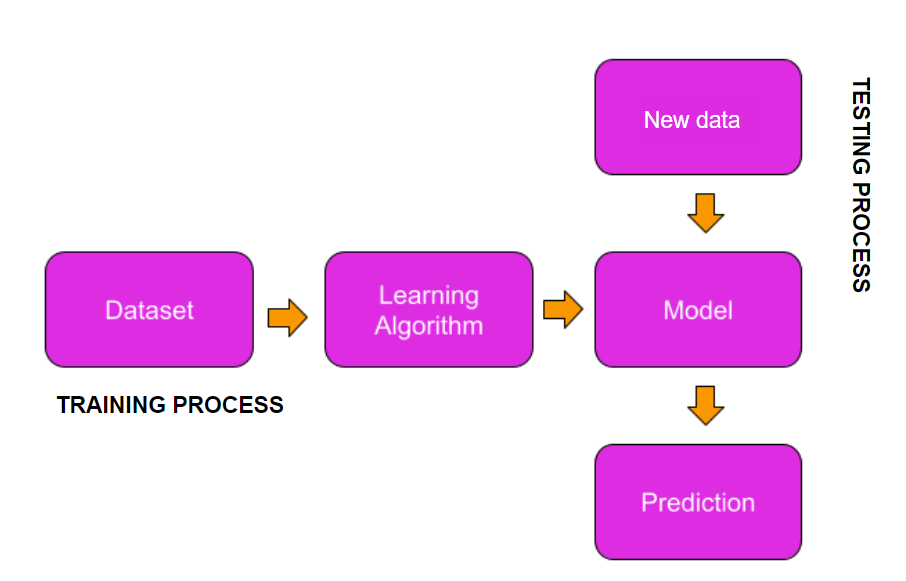
A learning algorithm is code that makes a model using training data
A machine learning model is a map from the input to the prediction
In supervised machine learning, the training dataset contains a set of labeled examples, so that the model will learn the labels that humans decided. During testing, the model will be given new, unlabeled data to test if it accurately classifies the input (assigns it the correct label).
Why is it important to separate training data and testing data?
Teachable Machine
Let’s start by getting a preview of what Teachable Machine can do!

While we won’t be coding to create the machine learning model for this mini-project, you’ll learn the basic process of training and testing a model, which is fundamental to any machine learning project. Let’s dive in!
Gather Your Data
Today, we’ll use Teachable Machine’s image classifier to train a model to recognize objects using your computer’s camera or uploaded images. These images will be the data for training your model.
- If you're using your computer’s camera, gather multiple examples of each object you want to train the model on. For example, if you choose pens, keys, and lip balm (three things often found in my purse), collect different examples of each from around your home.
- If you're using images instead, find and save pictures of each object on your computer. Organize them by category to make it easier to upload all images of the same object at once.
Once you have your objects (your data), you’re ready to start training!
Train Your Model
When you open your image project in Teachable Machine, it will show a space for each class. A class represents an object that you want the computer to recognize. You’ll edit the labels “Class 1” and “Class 2” with the specific class or label for each object. In my previous example, that might look like “pens” and “keys” for those labels.
Next, choose how to add your data: Webcam or Upload.
- Webcam: Grant Teachable Machine access to your camera, then capture images of your first object. Move it around and capture different angles to improve the dataset’s diversity.
- Upload: Select images from your files or import them from Google Drive.
Whichever method you choose, include multiple examples of each class so the model can learn patterns based on object features.
Once you're satisfied with your dataset, click "Train Model" to start the machine learning algorithm, which will analyze patterns and train the model. The training process takes some time, so sit back and relax!
Test Your Model
When your model is finished training, you’ll be able to test it! Try using a different example of each class and see how well your model can predict the correct class.
Why is it important to test your model with a different example of each object?
Want to make your model better? No problem! You can always go back and add more samples to your dataset. Keep testing and tweaking until your model recognizes objects the way you want. The more you train and test, the smarter your model gets!
Export Your Model
Finally, when you’re satisfied with your model, you can export it! Click “Export Model” and then select “Upload my model.” From there, you can copy your shareable link to share your project with the world!
Discuss
- How do you know if your model is performing well? What signs indicate it might need improvement?
- What methods improved the accuracy of your model?
- Why is it important to test your model with new data that wasn’t used during training?
How Does Teachable Machine Work?
Teachable Machine’s image classifier uses a pre-trained model called MobileNet, which was trained to recognize 1,000 different objects like cats, dogs, and even cars. MobileNet learns by extracting important features from images—such as shapes and textures—and converts each image into a format that computers understand—numbers!
The model converts the image into a list of numbers, or an embedding vector, that captures these features. Think of an embedding vector as a simple ordered list of numbers—like a unique fingerprint for each image. Because similar images produce similar vectors, the model can quickly compare a new image’s vector to those it has already seen, making it easy to classify or learn about new objects!
This process of building on a pre-trained model is called transfer learning. The knowledge MobileNet gained from its first round of training is reused to help the model quickly recognize new ones efficiently, even with only a few examples.
💼 Takeaways
In this lab, you learned how to train a machine learning model using Teachable Machine by collecting and labeling image data. You explored the difference between training and testing data. By testing your model with new data, you saw how well it could recognize patterns and identified ways to improve it, reinforcing the importance of diverse datasets in machine learning.
- Training data is used to teach the model by showing it labeled examples so it can learn patterns.
- Testing data is separate from training data and is used to check how well the model can recognize new, unseen examples.
- Machine learning models need a variety of labeled examples to identify features—the unique characteristics of an object that help the model recognize patterns.
For a summary of this lesson, check out the 7. Image Classification Lab One-Pager!